Beta
AlphaHuman Studio Standard, closed beta.
Your beta
Newest build
When a new build is out, AlphaHuman Studio asks you once, with what changed, and installs it when you press Update Now (the add-on's preferences keep an Update button for later). Messages from us appear the same way. Older builds are retired from time to time and stop activating.
Tell us
Every report is read. The best reporters go into a draw for full licences at the end.
Get started
Two parts, about fifteen minutes: bring a few MetaHumans out of Unreal once, then install the beta in Blender 5.2. The full tester guide has the same steps and more: what to test, how to report, and what to do if something goes wrong.
A. Export a few MetaHumans from Unreal 5.8
- Get AlphaHuman Studio for Unreal — free, on Fab. In the Epic Games Launcher: Unreal Engine → Library → Fab Library → AlphaHuman Studio → Install to Engine (5.8). Close Unreal while it installs.
- Make one folder for all your MetaHumans, for example
D:\MetaHumans. - Open a project with MetaHumans. Tools → AlphaHuman Studio → Export High-End Character… Pick one or more characters (Ctrl/Shift), choose that folder the first time, and press Export in Background. Each character gets its own folder: its DNA, textures and hair, with the hair's own colours.
- Clothes, if you want them: Tools → AlphaHuman Studio → Export Clothes…, into the same folder.
B. Install the beta in Blender 5.2
- Make an access token under Keys and copy it — it is shown once.
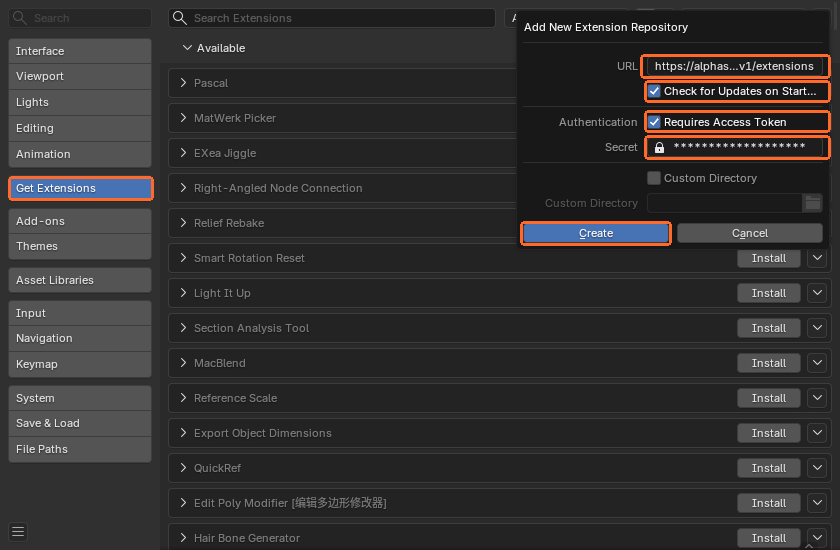
- In Blender: Edit → Preferences → Get Extensions. If Blender asks, allow online access. Open the Repositories menu at the top right, press +, then Add Remote Repository, and fill it in as the picture shows:
- URL:
- Check for Updates on Startup: on, so new builds find you
- Requires Access Token: on, and paste your token into Secret
- Type AlphaHuman in the search box and press Install. If another AlphaHuman Studio is installed (the Superhive or a test build), uninstall it first under Add-ons.

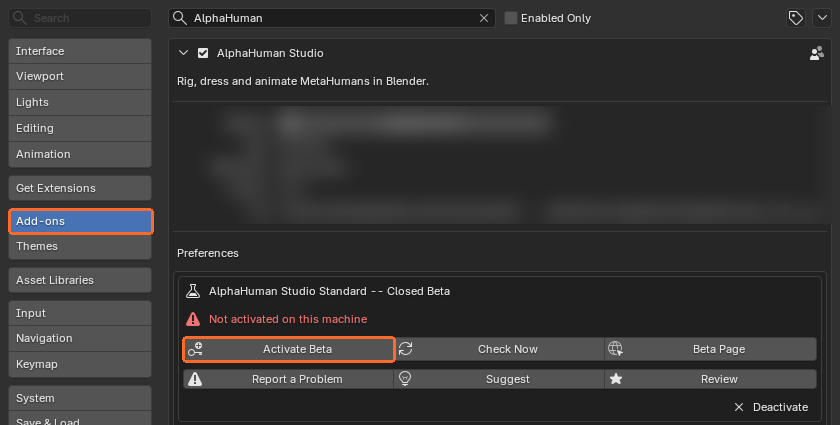
- Add-ons → AlphaHuman Studio, open it with the arrow and press Activate Beta. The token is filled in from the repository; your 30 days start now.
- In the same preferences, set MetaHuman Source Folder to the folder from part A. Then, in the 3D view, press N and open the AlphaHuman Studio tab: your characters are there to import.
Your computers
The beta works on this many computers at once. To move it, remove one here and activate on the new one.
| Computer | Build | Blender | Since | Last seen |
|---|
Fair use
The build and your token are for you alone. Each licence is locked to your own computers and renews itself about once a day while Blender is online; after about a week offline, the add-on asks to go online again.